You turn up the heat on a cold morning and nothing happens. The screen might be blank, it might show the right temperature but never click on, or your smart thermostat keeps dropping off Wi-Fi. Most thermostat problems come down to power, settings or wiring, and you can check all three yourself in under an hour.
This guide covers every common cause in the order a technician would check them: blank screens, wrong settings, C-wire power problems on smart thermostats, loose wires and bad placement. You’ll also find reset steps, a troubleshooting table and typical replacement costs.
Quick answer: Replace the batteries, then check that the HVAC breaker is on, the furnace power switch is on and the furnace door panel is firmly closed. Set the thermostat to Heat with a setpoint a few degrees above room temperature. If a wired thermostat is still blank, look for a blown fuse on the furnace control board or a loose wire behind the thermostat.
Why your thermostat screen is blank
A blank screen almost always means no power. Wired thermostats run on low-voltage power (about 24 volts AC) from a transformer in your furnace or air handler, so anything that shuts off the furnace can also shut off the thermostat. Check these in order.
Dead batteries
Many basic and programmable thermostats run on AA or AAA batteries, and some wired models use them as backup. Pull the thermostat off its wall plate or open the battery door and replace all the batteries with fresh alkaline ones, matching the plus and minus marks.
A tripped breaker
Your furnace or air handler has its own circuit in the main panel, usually labeled furnace, HVAC or air handler. Push that breaker fully to Off, then back to On. If it trips again right away, stop: a breaker that won’t stay on points to a fault, as explained in our guide to a circuit breaker that keeps tripping.
The furnace power switch is off
Most furnaces have a service switch that looks like a regular light switch, mounted on or near the unit. It’s easy to flip off by mistake. Make sure it’s On, and check that nobody left it off after maintenance.
The furnace door safety switch is open
Behind the lower front panel of most furnaces is a push-button safety switch. When the panel is in place, it presses the button and lets the system run. If you recently changed the filter and the panel isn’t seated properly, the switch cuts power to everything, thermostat included. Refit the panel so it sits flat and locks in place.
A blown fuse on the furnace control board
Many furnace control boards have a small blade fuse, like a car fuse, protecting the low-voltage circuit that feeds the thermostat. With the power off, remove the door and look for it on the board. A blown fuse has a broken metal strip inside. Replace it with one of the exact same amp rating. If the new fuse blows too, there’s a short in the thermostat wiring that needs to be found first.
A tripped float switch or limit switch
Central air, heat pumps and high-efficiency furnaces produce condensate, and many have a float switch that shuts the system down when the drain clogs and water backs up. On some older furnaces, a tripped high limit switch also cuts thermostat power. If you see water in a drain pan or around a condensate pump, clear the drain and the system should restart once the float drops.
Safety note: Always turn off the furnace power switch or breaker before removing furnace panels or touching thermostat wires. If you smell gas, don’t touch any switches. Leave the house and call your gas utility from outside.
Screen works but no heat: settings and mode problems
If the display is on but the furnace won’t start, the cause is often a setting rather than a fault. Check these first.
Wrong mode or setpoint
Make sure the mode says Heat, not Cool, Off or Auto. Then raise the setpoint 3 to 5 degrees above room temperature so the call for heat is obvious. If it’s set to 68°F and the room reads 67°F, the thermostat may simply be waiting because of its built-in temperature swing.
Other settings that block heat
- Schedule or hold: A program may lower the temperature right after you raise it. Use Hold or edit the schedule.
- Startup delay: Many thermostats wait a few minutes before starting the system after a change or power outage, sometimes showing “Wait” or a flashing icon.
- Fan set to On: The blower runs nonstop and pushes room-temperature air between heating cycles, which feels like the heat isn’t working. Set it to Auto.
- Wrong system type: After a replacement or factory reset, a thermostat configured for a gas furnace on a heat pump (or the reverse) can cool when you ask for heat. Check the installer settings.
Once the basics are right, our guide to the best thermostat settings for winter covers schedules that keep you comfortable without wasting energy.
Smart thermostat power problems and the C-wire
Wi-Fi thermostats need steady power for the screen, sensors and wireless radio. That usually comes from the C-wire (common wire), which completes the 24-volt circuit back to the furnace. Without it, some smart thermostats “borrow” power through the heating or cooling wires, which doesn’t work well with every system.
Signs of a C-wire problem
- A low-power or battery warning on a wired thermostat
- Dropping off Wi-Fi, restarting or going blank at random
- The furnace or fan clicking on and off briefly, or running when it shouldn’t
How to fix it
- Turn off power at the furnace switch or breaker and remove the thermostat from its base.
- Look for an unused wire folded back into the wall. Thermostat cables often have spares, commonly blue or black.
- Connect the spare to the C terminal on the base, then connect the same color wire to the C or COM terminal on the furnace control board.
- No spare? Use the power adapter some smart thermostat makers include or sell for systems without a C-wire.
- Restore power and check the thermostat’s power or technical info screen.
If you only have two wires and no adapter option, a pro can run new thermostat cable. Our walkthrough on how to install a smart thermostat covers compatibility checks before you buy.
Loose or damaged thermostat wires
Thermostat wires are thin and easy to knock loose when a faceplate comes off or a wall gets painted. One loose wire can stop heating, cooling or the fan while everything else seems normal.
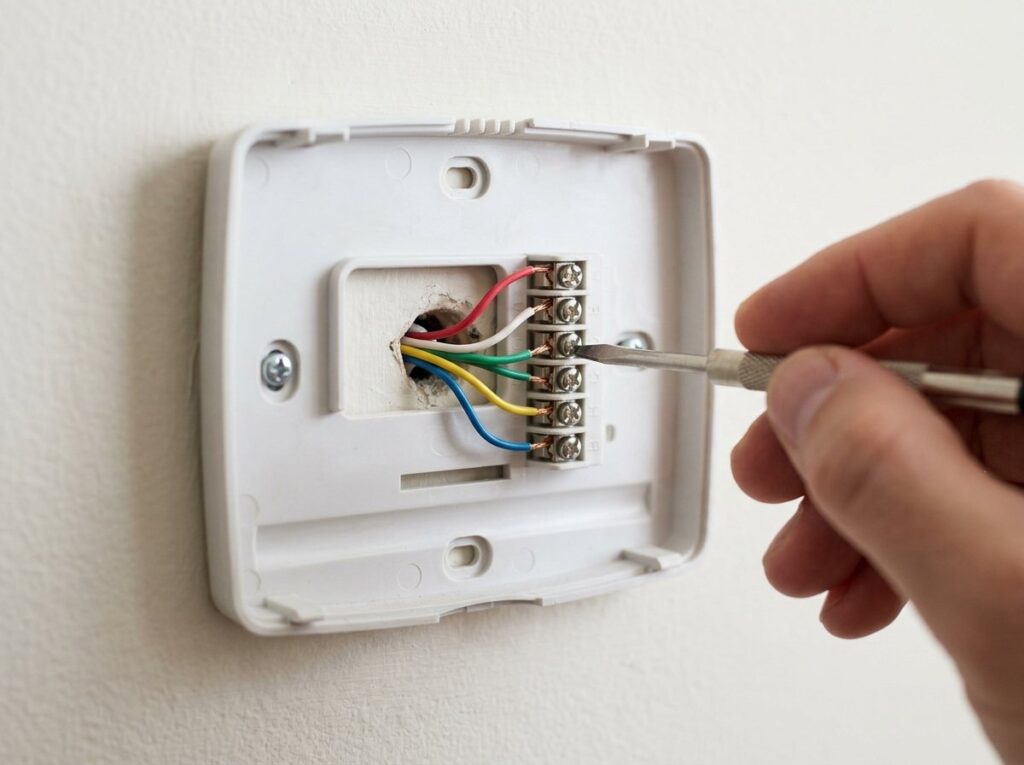
- Turn off power, remove the thermostat from its base and photograph the wiring.
- Gently tug each wire. Each should be held tight under its terminal.
- Look for broken insulation, green corrosion or bare ends touching. Trim and re-strip damaged ends so about a quarter inch of clean copper goes into the terminal.
- Check the other end at the furnace control board for the same problems.
- Reattach the thermostat, restore power and test heat, cooling and fan separately.
Common terminal letters are R (24-volt power), W (heat), Y (cooling), G (fan), C (common) and O or B (heat pump reversing valve). With a multimeter, you should read about 24 volts AC between R and C at the thermostat base. Power at the furnace but none at the thermostat means a broken wire in the wall.
Thermostat in the wrong location
A thermostat in the wrong spot reads the wrong temperature, so it shuts the heat off early or runs too long. Common problem spots include:
- Direct sunlight from a nearby window
- Near a supply register, radiator, fireplace or space heater
- Near a lamp, TV or kitchen appliances
- On an exterior wall or near a drafty door
- In a hallway or room far from where you spend time
One hidden cause is cold air from the wall cavity coming through the hole where the wire enters. Remove the thermostat and seal around the cable with non-hardening putty or a little foam. Moving a thermostat to an interior wall usually needs new wire, so it’s a good job for a pro. Some smart thermostats accept remote room sensors instead.
How to reset a thermostat
A reset can clear a frozen screen or a confused schedule. Start gently and save a factory reset for last, because it erases your schedule and, on smart models, your Wi-Fi and system setup.
- Power cycle the system: Turn off the furnace switch or breaker for about a minute, then turn it back on.
- Restart the thermostat: On battery models, remove the batteries for a minute and fit fresh ones. On smart models, use the restart option in the settings menu or app.
- Use the reset button or menu: Some models have a reset button or menu option. The manual is usually free on the maker’s website.
- Factory reset if needed: Photograph your installer settings first, then re-enter the system type, schedule and Wi-Fi details afterward.
Thermostat troubleshooting table
| Symptom | Likely cause | What to do |
|---|---|---|
| Blank screen, battery model | Dead batteries | Fit fresh alkaline batteries |
| Blank screen, wired model | Breaker, furnace switch, door switch or fuse | Check each, then the control board fuse |
| Blank screen, water near indoor unit | Tripped float switch | Clear the drain line and empty the pan |
| Screen on, no heat | Wrong mode, low setpoint, hold or delay | Set to Heat, raise 3 to 5°F, wait a few minutes |
| Cool air between cycles | Fan set to On | Switch the fan to Auto |
| Smart thermostat reboots or loses Wi-Fi | No C-wire or weak power | Connect a spare wire to C or add an adapter |
| Heat works, cooling or fan doesn’t | Loose or broken wire | Check terminals at both ends |
| Display doesn’t match the room | Bad location or wall draft | Seal the wire hole, remove heat sources |
| Replacement fuse blows again | Short in thermostat wiring | Call a pro to trace the short |
Tools and materials
- Small Phillips and flat screwdrivers
- Fresh AA or AAA alkaline batteries
- Flashlight and a phone camera for wiring photos
- Digital multimeter (optional)
- Wire stripper
- Replacement blade fuse with the same amp rating, if needed
- Non-hardening putty or foam sealant
Thermostat replacement cost
If your thermostat shows scorch marks, smells burnt or won’t work with good power and wiring, replacement is usually cheaper than chasing faults. Fixr’s cost guide puts a typical replacement around $200 on average, and Angi lists a typical range of about $115 to $265 depending on the model.
| Thermostat type | Typical installed cost | Good fit for |
|---|---|---|
| Manual | $50 to $150 | Simple systems and rentals |
| Non-programmable digital | $85 to $200 | Easy reading, no schedule |
| Programmable | $100 to $300 | Regular weekly routines |
| Smart or Wi-Fi | $185 to $600 | App control and remote sensors |
Fixr lists electrician labor at about $65 to $100 per hour, with most swaps taking one to two hours, and running new thermostat wiring can add roughly $90 to $400. Swapping a basic thermostat for a similar one is a reasonable DIY job if you photograph the wiring and turn the power off first.
When to call a pro
Call an HVAC technician if power, settings and wiring check out but the system still won’t respond, or if you see these red flags:
- The HVAC breaker trips again after a reset
- A new control board fuse blows right away or within days
- No 24-volt power at the furnace, pointing to a failed transformer or control board
- Scorch marks or a burning plastic smell at the thermostat or furnace
- You need a new C-wire run or the thermostat moved
- A heat pump with auxiliary heat whose wiring doesn’t match your new thermostat
If the thermostat checks out but the furnace still won’t fire, see our guide to a furnace not turning on. Expect a service call fee on top of parts and labor, and ask for a quote before work begins.
Frequently asked questions
Why is my thermostat blank after I changed the batteries?
Check that the batteries face the right way and are fresh alkaline cells. On a wired model, the batteries may only be a backup, so the real cause is lost power from the furnace. Check the breaker, furnace switch, door panel and control board fuse.
How do I know if my thermostat is bad?
It’s likely bad if it has steady 24-volt power between R and C, the wires are tight and correct, and it still won’t display or call for heat. Burn marks or a hot plastic smell are other clues. A technician can confirm by bypassing the thermostat at the furnace.
Why does my thermostat say heat is on but no heat comes out?
Wait a few minutes first, since many systems have a startup delay. If the furnace still doesn’t run, the problem is likely at the furnace, such as a clogged filter, tripped limit switch or ignition fault. If air blows but feels cool, set the fan to Auto.
Do smart thermostats need a C-wire?
Most Wi-Fi thermostats work best with one because it gives constant power. Some run without it but may lose Wi-Fi or cause odd cycling. Check the maker’s compatibility tool before buying, and look for a spare wire in your cable first.
The bottom line
Most thermostats stop working for simple reasons: dead batteries, a tripped breaker, a furnace switch or door panel left open, or a setting that quietly blocks heat. Work from power to settings to wiring and you’ll fix most problems without a service call. If fuses keep blowing, the breaker won’t stay on or you smell burning, shut the system off and call a pro.